Showing posts with label mobile. Show all posts

Monday, 7 March 2016

How MAC Address Randomization Works on Windows 10

When Apple announced its devices would use random MAC addresses when searching for Wi-Fi networks, it received extensive media attention. And rightly so. It prevents companies from tracking your movements, and Apple was the first major player to start doing this. Windows and Android are quietly trying to catch up. As a result, some devices running Windows now support MAC address randomization, and we will discuss how it's implemented, and where it fails. This information is a small selection from the recent paper Why MAC Address Randomization is not Enough: An Analysis of Wi-Fi Network Discovery Mechanisms.

Update: we have contacted Microsoft, and they are in the process of addressing the vulnerabilities we discovered.

How it works

Microsoft first added support for MAC address randomization in Windows 10. Unfortunately, it's only available if you have a WiFi card and driver that support it. For example, the Intel 7265 AC, when using the latest driver, supports randomization [1]. You can see if your hardware supports MAC address randomization by going through the following menus:


If your hardware supports MAC address randomization, you will see the following option at the top of the window:


As you can see, I have it enabled on my laptop. So far it's been working quite well. What's very interesting about Microsoft's approach is that it also uses random MAC addresses when connecting to a wireless networks. In contrast, Apple only uses random addresses when searching for nearby networks, and it falls back to its original address when connecting to a network. In this aspect Windows 10 offers better privacy than Apple.

Using a random MAC address to connect to a network can cause problems if users are authenticated (i.e., recognized) based on their MAC address [2]. Interestingly, Windows avoids this issue by always using the same random address every time it connect to a specific network. For example, let's say you want to pay for Wi-Fi access, and they authenticate you based on your MAC address. Then this is not a problem. The first time you connect, Windows will generate a random MAC address. And if you reconnect to this network at a later point in time, Windows will reuse the previously generated address. Therefore the system can still recognize you, and you don't have to pay twice. There's one downside to this approach: since you always use the same address when connecting to a particular network, an adversary can learn when certain devices connect to specific networks. Nevertheless, compared to the old situation where you'd always use the original MAC address, it improves your privacy.

Technically, the random MAC address that is used to connect to a network is calculated as [5]:
address = SHA-256(SSID, real MAC address, connectionId, secret)[:6]
Here SSID is the name of the network you are connecting to, real MAC address the original address of your network interface, and connectionId is a value that changes every time the user removes (and re-adds) the network (i.e., this value is updated if you "forget" the network under Windows 10). The secret parameter is a 256-bit cryptographic random number, generated during system initialization, and kept the same across reboots. Every interface has a different value of the secret parameter, to assure each interface gets different random MAC address. Finally, bits in the most significant byte of address are set so it becomes a locally administered, unicast address. While the presentation by Huitema partly described this process, our paper is the first to describe this formula in full detail.

It's also possible to disable randomization for certain networks. In this case Windows will use the original address when connecting to a network. You can configure this through the following settings when you are currently connected to the network:
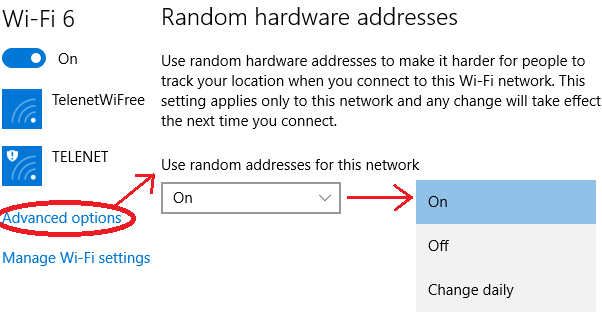
Notice that the user has three options for each specific network:
  • On: the same random MAC address is always used when connecting to this network.
  • Off: the original MAC address is used.
  • Change daily: every day a new random MAC address is used.
Remark that if randomization is enabled, independent of the above options, Windows 10 will always use random MAC addresses when scanning for nearby networks. This "scanning" address changes every time you connect (and disconnect) from a network, and when you restart your device [3]. Hence it doesn't change that frequently, but it's still sufficient to prevent tracking over extended periods of time. In contrast, Apple changes the scanning address roughly every few minutes, which provides more privacy.

Basic Security Analysis

Randomization as implemented in Windows 10 significantly improves your privacy. So enable it! Unfortunately, it's not perfect, because there are still some ways to defeat or bypass it.

The first weakness is that the sequence number contained in WiFi frames is not reset when changing the (random) MAC address. This sequence number, which is present in most Wi-Fi frames, is used to detected retransmissions, and is incremented by one after successfully transmitting a frame. As shown in the picture below, when the MAC address changes because the user connects to a network, the sequence counter is not reset:


The last frame from ea:69:0a:* has the sequence number of 92, and the other address 7c:5c:f8:* has the sequence number 94. Based on this an adversary can reasonably conclude that both frames are sent by the same device. In other words, he learns that the same device was using both addresses, defeating the purpose of address randomization.

The second problem is that Windows 10 reveals its real MAC address when interacting with Hotspot 2.0 networks. But what's Hotspot 2.0? Simply put, Hotspot 2.0 is a new standard to automatically and securely roam between WiFi networks. No manual interaction is needed. Your device automatically determines whether you have the appropriate credentials (passwords) to connect to a network. Think of this like the cellular network: when you get off the plane, your phone automatically finds and connects to a foreign cellular network. Hotspot 2.0 provides a similar experience for WiFi.

In order to accomplish automatic roaming, Hotspot 2.0 sends ANQP queries to the Access Point before connecting to it. These ANQP queries request detailed information about the wireless network. This information includes the credentials that are needed to connect with the hotspot, whether the hotspot provides internet access or only local network access, etc. Unfortunately, Windows 10 sends these ANQP queries using the real (original) MAC address:


In the first probe request it uses the random MAC address 2a:b3:e6:*. These probe requests are used to detect the presence of networks. If there's a Hotspot 2.0 network nearby, Windows will send ANQP requests using the real MAC address, in this case 7c:5c:f8:*. Therefore an attacker can obtain your real MAC address by advertising a Hotspot 2.0 network. Thankfully, Windows 10 only sends ANQP queries if at least one Hotspot 2.0 is configured. Since this standard is not yet widely deployed, few users will have such a network configured [4].

Detailed Security Analysis

Want to know all flaws that are present in existing implementations of MAC address randomization? And this specifically for Android, Apple, Linux, and Windows? Then read my paper Why MAC Address Randomization is not Enough: An Analysis of Wi-Fi Network Discovery Mechanisms [5]! It has everything explained in technical detail.


References and Footnotes

[1] If you have an Intel 7260 AC, you can also force Windows 10 to use the drivers of the Intel 7265 AC. Your device will still work, and will support MAC address randomization.
[2] Even though authentication based on the MAC address is utterly insecure (an adversary can easily spoof a MAC address), it's still used by many systems.
[3] C. Huitema. Personal communication, Nov. 2015.
[4] One notable exception is the Passpoint configuration provided by Boingo. Essentially Passpoint is a synonym of Hotspot 2.0. If you have this configuration installed, you have a Hotspot 2.0 capable device, and the Boingo configuration will use Hotspot 2.0. This means Windows will send ANQP queries to nearby Hotspot 2.0 networks.
[5] M. Vanhoef, C. Matte, M. Cunche, L. S. Cardoso, and F. Piessens. Why MAC Address Randomization is not Enough: An Analysis of Wi-Fi Network Discovery Mechanisms (AsiaCCS 2016).

Saturday, 28 July 2012

WhatsApp Follow Up: Unauthenticated Upload

A bit more than two months ago I wrote a rather large post on the lack of security in WhatsApp. The conclusion of that post was that WhatsApp is insecure but they're working on it. Personally I'd never use it to send serious/secret/sensitive messages.

But not all the security vulnerabilities were explained in that post! There was one more, one that might be very severe. I also contact WhatsApp about this vulnerability and they said it would take some time to fix the issue. Considering that was more than two months ago they've had enough time to fix it. After explaining the problem we'll check if it's still present in the current version of WhatsApp.

The Problem

When using WhatsApp it's possible to send attachments to your contacts. The files you send to each other are saved on the server of WhatsApp so the recipient can download them at all times. Uploading is done by sending the following POST request over HTTPS:


Notice that no login details are required. For the example shown the file got uploaded to
https://mms303.whatsapp.net/d11/27/17/3/a/3a.html
which includes the original file name. In fact you can open the above file and see the html file. This means even though files get uploaded with a Content-Type of application/octet-stream they're still being treated as an ordinary HTML file once uploaded. This of course makes you wonder whats happens when sharing php files using WhatsApp. I tried uploading the same file as shown in the screenshot but now I named it 3a.php. The upload was successful and the file was saved at
https://mms303.whatsapp.net/d4/27/17/3/a/3a.php
but as you'll notice opening .php files is blocked with a 403 error message. Furthermore filenames such as index.php and .htaccess are blocked. So some protection seems to be included to avoid the user from uploading malicious files. Unfortunately I can't further test their server-side security since if I did that, I would be attacking their server and breaking the law.

So at first sight malicious files can't be uploaded. However only very minimal tests are possible without having permission of WhatsApp to test it in detail. But the fact is that it's not designed with security in mind.

Current Situation

After starting my Android emulator again (also after two months) and opening WhatsApp I was greeted with the message that my current version of WhatsApp was out of date. In fact it was so old that it simply couldn't connect to the WhatsApp servers. This seemed good. Maybe they also changed the upload process and it's now all authenticated and secure.

Unfortunately I got my hopes up too early - the bug wasn't fixed. The method outlined above still works and anyone can upload files. Considering this issue was reported more than two months ago I have decided to make it public in the hopes it will get fixed sooner.

WhatsApp could give every uploaded file a random filename. All downloaded files should be treated with a Content Type of application/octet-stream, which is currently not being done since the .html file could displayed in the browser. And of course only authentication users should be able to upload files!

Conclusion

As I've said before: watch you when using WhatsApp. Don't use it for any serious or important messages. Don't blindly trust incoming messages.

Tuesday, 22 May 2012

WhatsApp Considered Insecure (2012)

The views expressed here reflect the views of the author alone, and do not necessarily reflect the views of any of their organizations.

Summary

Since this post gets many hits let's start right away with the conclusion: I consider WhatsApp to be insecure. Personally I'd never use it to send serious/secret/sensitive messages. And you should never blindly trust incoming messages!

Introduction

Quick links: WhatsApp Security Advisory MVSA-1 and MVSA-2.

During my internship at a Ernst & Young I created a methodology to test the security of mobile applications.  After I finished it, and after completing my internship successfully, I decided to take a look at WhatsApp and apply the methodology I created on my own. Several new vulnerabilities were found, including a very severe one that even affected people not using WhatsApp. But before going into detail let's first investigate the security history of WhatsApp.

WhatsApp Security History

Over its lifetime WhatsApp has gotten some bad security attention. One of the first vulnerabilities was found in May 2011 where an authentication flaw was found making it possible to register any phone number. This video demonstrates the flaw. As will be explain in this post, there were (are?) still flaws in the phone number verification process.

Around the same time it was found that WhatsApp doesn't encrypt the messages you send and receive, meaning that if you use an unsecure wireless network people can sniff your WhatsApp messages. A few days ago a script was released demonstrating how an attacker can abuse this flaw to sniff all the messages you send and receive [Article]. At the time of writing this post this vulnerability has been fixed for some clients but not for all (notably it's fixed for Android).

In September 2011 two new vulnerabilities were found in the registration process of WhatsApp. The first was found by Andreas Kurtz and the second by SEC Consult. The one found by Kurtz is a symptom of a fundamentally flawed registration process. In essence during the registration process the servers of WhatsApp fully trust anything the client says. However everything happening on the phone (= client) can be manipulated by someone with sufficient technical skills. In security it's well known to never trust anything the client is telling. Unfortunately that's exactly what WhatsApp is doing. Again this flaw in the registration process has not been adequately fixed.

The second vulnerability found by SEC Consult also allows an attacker to register any phone number he or she wants (by brute forcing the challenge PIN number). WhatsApp has implemented a basic fix, but as SEC Consult already mentions it provides insufficient protection. An attacker targeting a group of, say, 100 people, will on average still successfully compromise at least one individual.

During their research SEC Consult also found another vulnerability which makes it possible to change the status of any WhatsApp user. They reported this issue to WhatsApp but after waiting 3 months WhatsApp still didn't fix the issue, so they decided to make the information public [Source]. As a result someone created the website whatsappstatus.net where anyone could enter someone's phone number and the new status message of the user [Article, Blogpost, Script]. This removed the small technical knowledge needed to execute this attack. Fortunately this has now been fixed and whatsappstatus.net is no longer online.


To provide some more background the research paper "Evaluating the Security of Smartphone Messaging Applications" is also interesting. It shows that nearly all mobile messaging applications have some security vulnerabilities. So although WhatsApp will be subject of this post, remember that other mobile applications might also contain several vulnerabilities. If you want to have some fun yourself I suggest checking out the applications mentioned in that paper ;)

Anyway all this shows that WhatsApp had some severe vulnerabilities in the past. The phone number registration flaws are a symptom of a fundamentally flawed design. Their late response to the work of SEC Consult also isn't good. Another big negative is that they never mention security updates on their website. As a security researcher you don't know whether or not a vulnerability has been fixed. And as a user of WhatsApp you are never warned of potential problems!

Man, this section turned out longer than expected (actually this whole blog post is a lot longer than expected :). Time to move on the real stuff!

Authentication Design Flaw(s)

When researching WhatsApp I started by investigating the registration process of WhatsApp. And this was also where the first severe vulnerability was found. To understand this vulnerability we'll first have to understand the registration process. It begins with the user entering his or her phone number, after which WhatsApp will issue the following HTTPS request:
https://r.whatsapp.net:443/v1/exist.php?cc=<cc>&in=<phone>&udid=<id>&sim=<sim>
Here <cc> and <phone> stand for the country code and phone number entered by the user, <id> for the hardware identifier of the device, and <sim> for the MSISDN of the device (the real phone number of the phone). The sim parameter is not used and can be dropped. Essentially this request checks if the phone number has already been registered on the device. If it hasn't been registered the reply will be as follows
<?xml version="1.0" encoding="UTF-8"?>
<exist><response status="fail" result="incorrect"/></exist>
This mechanism is interesting in its own right. But for now we'll ignore this request and come back to it later (see section "What's the Password?"). So let's say the phone number hasn't yet been registered on the device. WhatsApp continues by making a second HTTPS request:
https://r.whatsapp.net:443/v1/code.php?cc=<cc>&to=<cc><phone>&in=<phone>&lg=en&lc=US&mnc=260&mcc=310&imsi=<imsi>&method=self&reason=&token=<token>&sim=<sim>
An example value of <token> is 9fe2a4f90b4acff715d1daf84428bddd. You'd think this token is going to be used in the next stages somehow. But it's not. WhatsApp has made several of these strange implementation decisions, so don't be surprised when more strange behaviour is going to be discussed. Also note the parameter method which specifies the authentication method used. WhatsApp offers several authentication methods in an attempt to assure one of them will always work. The "self" method is used first. Anyway the default response to this request is of the form
<?xml version="1.0" encoding="UTF-8"?>
<code><response status="success-attached" result="613"/></code>
The success-attached parameter is interesting and it's corresponding value, here 613, will be of importance during the next stages of the registration process. When the response is received WhatsApp continues by asking the user if he or she really wants to register the given phone number.


When the user clicks OK WhatsApp will attempt to send a special SMS message to the phone itself. The code that achieves this is:


As you can see the SMS message "WhatsApp <code> WhatsApp internal use - safe to discard" is sent to a random port of the phone number the user is trying to register. An example of the included <code> is ROGEuMirJNfCqXnuFdSUrwGYYfeA8G36. So essentially we're sending an SMS message to ourselves. After sending the message WhatsApp will monitor incoming messages. Unfortunately I'm using the Android emulator and can't fully emulate the required behavior yet (intercepting outgoing SMS messages on the Android emulator, and sending data SMS messages, is a good subject for a new blog post). My guess is that if WhatsApp detects that an SMS message is received from the phone number the user is trying to register, and has the exact same <code> as previously transmitted, it will complete the registration.

Now after getting this far we can do some very targeted google searches to see if other researchers are also working on this. And indeed! We find a Spanish blog post of Jose Selvi where he has done similar research. His post confirms our guess and even has a small video demonstrating the process.


So when WhatsApp receives the SMS it sent itself, it continues by registering the phone number. This contains a huge design flaw. The client (so your phone) is fully trusted! Basically the client does some stuff, and then tells the WhatsApp servers "hey register this number". But like we mentioned the client can't be trusted. And this has been demonstrated by modifying the WhatsApp client so an attacker can register any phone number he or she wants [Source].

Selvi has reported this vulnerability to WhatsApp and apparently they "fixed" it. But how can it be fixed if they're still using the method and still trusting the client?! I contacted WhatsApp myself and asked them about this. They answered that the "self" authentication is still in use, and that "the described method as published in the url has been resolved". Of course it's not because the exact method described by Selvi no longer works that it's safe! As mentioned on the blog:
"No obstante, no se ha realizado una auditoría profunda de la aplicación más allá de la prueba de concepto que se realizó como demostración de la charla, por lo que es posible que otras vulnerabilidades similares, o de otro tipo, puedan existir."
Roughly translated he's saying that no real audit of WhatsApp has been made and that it's possible vulnerabilities still exists (thanks google translate). In a comment on his blog it was even mentioned that more vulnerabilities were found. However these are not published so we have no idea how they work exactly.

After all this it's no longer our task to demonstrate these vulnerabilities to convince WhatsApp that they should improve their security. It's a waste of time. It's now WhatsApp responsibility to prove their registration process is secure. Not the other way around. I consider it completely broken and insecure until proven otherwise. I contacted WhatsApp and explained that the client can't be trusted to prove the phone number actually belonged to the user. As a reply I got the message "understood", so let's hope they'll actually remove this inherently flawed authentication method in the future.


Server Sent Verification SMS

In case the "self" authentication method fails a second method is used. It begin by requesting the HTTPS page
https://r.whatsapp.net:443/v1/code.php?cc=<cc>&to=<cc><phone>&in=<phone>&lg=en&lc=US&mnc=260&mcc=310&imsi=<imsi>&method=sms&reason=self-send-timeout&token=<token>&sim=<sim>
Note that the method parameter is now set to sms. When the WhatsApp server receives this request it will send a text message containing "WhatsApp code <pin>" to the phone number specified in the HTTP request. Here <pin> is a 3 digit number. WhatsApp will attempt to detect this incoming message. If the phone number entered by the user is indeed his/her number the text message will arrive. When the message is received WhatsApp will prove this to the server by sending the challenge <pin> number using the following request
https://r.whatsapp.net:443/v1/register.php?cc=<cc>&in=<phone>&udid=<udid>&code=<pin>
If the pin is correct the phone number will now to tied to the given hardware id (udid). Essentially the phone number will be the username and the hardware id will be the password. This is another mistake: the hardware identifier (i.e. the password) can be read by other applications! More on that later though.

Remember the number included in the success-attached response earlier? Go look again, it's right above the "We will be verifying the phone number XXX" screenshot. In our case the number was 613. Well guess what, this is the number WhatsApp (used to) include in the challenge SMS message! Hence you don't have to own the phone number to register it. Simply write down the number in success-attached and request the register.php page with this pin number. The vulnerability has been demonstrated on a test phone number given by WhatsApp and worked.

This vulnerability has been reported to WhatsApp and has been fixed as explained in my security advisory. Important is that this affected people not using WhatsApp too! An attacker could register your phone number and send messages in your name to all your friends who use WhatsApp. He or she would also receive all messages send by people using WhatsApp.

Sent PIN by Voice Call

Finally it's possible to let WhatsApp send the PIN by a voice call. This is basically the same as the server sent verification SMS, except that the user now has to answer the voice call and manually enter the pin number.

Responsible Vulnerability Disclosure

After finding the registration vulnerability (and a few others) I decided to contact WhatsApp. The plan was to get these vulnerabilities fixed before making them public. This is something where WhatsApp did do well: they responded timely to all my emails and remarks. The security advisory includes a timeline of messages sent. Based on this I had good hope to get most of these issues resolved.

After contacting them they requested a demonstration of the phone number registration vulnerability on a test phone number. So I registered the test phone number using the technique we just covered. As a response they said an updated client for Android was available which solved the registration vulnerability. This was strange since the vulnerability can only be fixed server side! And indeed the vulnerability was not fixed.. So I investigated what can be done to fix the vulnerability. Apparently you can't simply leave out the success-attached parameter in the response since the client requires this parameter to be present. Hence I suggested to simply include a random PIN number for the success-attached parameter. They agreed. And so this vulnerability was fixed :)


Another vulnerability I discovered was that the Android client didn't verify the Common Name of the HTTPS certificate. Remember that all request made when registering the phone are done over a secure HTTPS connection. Unfortunately this vulnerability allows an attacker to intercept all traffic when he or she is performing a man-in-the-middle attack. Any valid certificate would be accepted by the Android client. This vulnerability was also reported to WhatsApp and has been fixed in the latest Android Client.

Finally a less severe vulnerability was also reported and patched. It was a full path disclosure in a PHP warning. The functions producing the warning appeared not to be further exploitable, although this hasn't been explicitly tested. A redacted screenshot of the warning can be seen here.

I also asked them when encryption will be implemented for sending and receiving messages. Apparently they already submitted an Android version using an encrypted channel on May 7. An update for the Windows Phone was submitted to the marketplace on May 11. They can't say when the other versions will be patched because each version has its own software stack and development cycle. Although I cannot test the versions currently in the marketplaces, the Android version available on the WhatsApp website indeed uses encryption to send its messages. The actual strength of the encryption system has not been investigated.

Brute Forcing the PIN

Currently WhatsApp uses a basic brute force protection which allows the user to guess the PIN number only 10 times. After more than 10 attempts the phone number is blocked and one must contact WhatsApp in order to register the number. However the pin number has only 10^3 = 1000 possible values. As already mentioned by the security advisory of SEC Consult this doesn't provide sufficient protection.

The problem is that it's still feasible to attack a group of users. For example when attacking a group of 30 users the probably that all brute force attempts fail is (990/1000)^30 = 76%. In turn this means the probability of at least one successful brute force attempt among the 30 users is 24%. This is too high. The PIN number should be a lot larger! In a response to this WhatsApp stated that they are actively working on brute force protections. So, although the current brute force protection is a lot better than nothing, hopefully it will be improved in the future.

Auto Update Vulnerabilities

This one only applies to the Android version when directly downloaded from the website of WhatsApp. Versions downloaded from the marketplace use a different updating mechanism. Anyway, during startup it checks the following URL to see if an update is available:
www.whatsapp.com:80/android/9/WhatsApp.version
This page returns the version number of the latest available client for Android, for example 2.7.7435. If this version number is higher than the installed version WhatsApp will first request the checksum of the latest .apk file of the Android file by loading the URL
www.whatsapp.com:80/android/9/WhatsApp.cksum
An example response is 4273431032. It then continues by requesting the new .apk file
www.whatsapp.com:80/android/9/WhatsApp.apk
The problem is that all this is done over an unsecured HTTP connection. And unfortunately WhatsApp doesn't verify the downloaded .apk using a digital signature or similar. Thus an attacker can intercept these requests and force the user into downloading a malicious .apk file. So that's the first vulnerability: an attacker can intercept the HTTP traffic and injecting his own application. When further investigating the auto update functionality we find more. The downloaded .apk file is saved to
/mnt/sdcard/WhatsApp/WhatsApp.apk
and accompanied with the empty file called WhatsApp.upgrade in the same directory. The next time WhatsApp starts it will look for these files, and if both are present display a dialog asking if the user wants to install the update:


Unfortunately this can be abused by a 3rd party application. A 3rd party application can write the files WhatsApp.apk and WhatsApp.upgradate to the directory /mnt/sdcard/WhatsApp, where WhatsApp.apk can be a malicious application. This will trigger the update dialog of WhatsApp as shown above. The user will them be prompted to install the malicious application from the context of WhatsApp. So luckily the user still has to approve the installation. But because he or she thinks the program is an update of WhatsApp it's more likely that the user will agree to install the application, especially if the name would be similar to WhatsApp and uses the same logo. This is not something you want!

What's the Password?

Time to return to the very first HTTPS request sent when registering a phone number. It was
https://r.whatsapp.net:443/v1/exist.php?cc=<cc>&in=<phone>&udid=<id>&sim=<sim>
Where the sim parameter can be dropped. What's interesting is that if the number was previously registered on the phone this request will return
<?xml version="1.0" encoding="UTF-8"?>
<exist><response status="ok" result="<cc><phone>"/></exist>
and WhatsApp will start and log you in. No further information is needed! From this behavior we can derive that the phone number can be seen as the username and the udid as the password. The udid is a "Unique Device IDentifier" of the phone (a hardware id).

There's one problem with this design, namely that every application on your phone can read this unique device identifier (given the appropriate permissions). For example on Android an application having the permission android.permission.READ_PHONE_STATE can read the udid. Let's phrase this differently: another application can read your WhatsApp password and impersonate you. WhatsApp has responded that they are "working on unique 160-bite [sic] random passwords, but is going to take some time".

Conclusion

Let's recall the research paper "Evaluating the Security of Smartphone Messaging Applications" where it was shown that nearly all mobile messaging applications contained security vulnerabilities. In this post we specifically targeted WhatsApp. We found that it contained numerous vulnerabilities, and I personally consider WhatsApp an insecure application that I wouldn't use. On the bright side WhatsApp is taking these security issues more seriously and appears to be in the processing fixing all mentioned vulnerabilities. Only time will tell if they actually manage to make it a secure application or not. It's also an open question how insecure the other messaging applications really are.

In general mobile developers need to learn more about security!