Showing posts with label privacy. Show all posts

Monday, 20 February 2017

Windows 10 Lock Screen: Abusing the Network UI for Backdoors (and how to disable it)

This is a short blog post about a peculiar decision that Microsoft made. When you lock your computer on Windows 10, you are still able to connect to wireless networks. It's even possible to connect to new networks. You simply click on the network icon in the bottom right, and then add the wireless network:


So what's the deal with this? Well, it means that anyone can make your device connect to a possibly malicious wireless network. As an attacker you simply have to broadcast a network, wait until it shows up in the network list, and connect to it:


The victim will now automatically connect to the attacker's network whenever it is nearby. This is unwanted behavior. Since the victim automatically connects to it, it can be used to track the victim, and to intercept and manipulate his or her network traffic.


This is not ideal. When I lock my laptop, I don't expect someone to able to change my network configuration! But now someone can add a (possibly unencrypted!) wireless network to my config, and my device will automatically connect to it.

Thankfully, it's possible to disable the network menu at the lock screen. Open the Windows menu and type "Edit group policy" and open this tool. Now go to "Computer Configuration\Administration Templates\System\Logon" and enable "Do not display network selection UI":


And now the network icon is gone in your lock screen. No annoying people can now mess with your network configuration when you lock your device!

Monday, 7 March 2016

How MAC Address Randomization Works on Windows 10

When Apple announced its devices would use random MAC addresses when searching for Wi-Fi networks, it received extensive media attention. And rightly so. It prevents companies from tracking your movements, and Apple was the first major player to start doing this. Windows and Android are quietly trying to catch up. As a result, some devices running Windows now support MAC address randomization, and we will discuss how it's implemented, and where it fails. This information is a small selection from the recent paper Why MAC Address Randomization is not Enough: An Analysis of Wi-Fi Network Discovery Mechanisms.

Update: we have contacted Microsoft, and they are in the process of addressing the vulnerabilities we discovered.

How it works

Microsoft first added support for MAC address randomization in Windows 10. Unfortunately, it's only available if you have a WiFi card and driver that support it. For example, the Intel 7265 AC, when using the latest driver, supports randomization [1]. You can see if your hardware supports MAC address randomization by going through the following menus:


If your hardware supports MAC address randomization, you will see the following option at the top of the window:


As you can see, I have it enabled on my laptop. So far it's been working quite well. What's very interesting about Microsoft's approach is that it also uses random MAC addresses when connecting to a wireless networks. In contrast, Apple only uses random addresses when searching for nearby networks, and it falls back to its original address when connecting to a network. In this aspect Windows 10 offers better privacy than Apple.

Using a random MAC address to connect to a network can cause problems if users are authenticated (i.e., recognized) based on their MAC address [2]. Interestingly, Windows avoids this issue by always using the same random address every time it connect to a specific network. For example, let's say you want to pay for Wi-Fi access, and they authenticate you based on your MAC address. Then this is not a problem. The first time you connect, Windows will generate a random MAC address. And if you reconnect to this network at a later point in time, Windows will reuse the previously generated address. Therefore the system can still recognize you, and you don't have to pay twice. There's one downside to this approach: since you always use the same address when connecting to a particular network, an adversary can learn when certain devices connect to specific networks. Nevertheless, compared to the old situation where you'd always use the original MAC address, it improves your privacy.

Technically, the random MAC address that is used to connect to a network is calculated as [5]:
address = SHA-256(SSID, real MAC address, connectionId, secret)[:6]
Here SSID is the name of the network you are connecting to, real MAC address the original address of your network interface, and connectionId is a value that changes every time the user removes (and re-adds) the network (i.e., this value is updated if you "forget" the network under Windows 10). The secret parameter is a 256-bit cryptographic random number, generated during system initialization, and kept the same across reboots. Every interface has a different value of the secret parameter, to assure each interface gets different random MAC address. Finally, bits in the most significant byte of address are set so it becomes a locally administered, unicast address. While the presentation by Huitema partly described this process, our paper is the first to describe this formula in full detail.

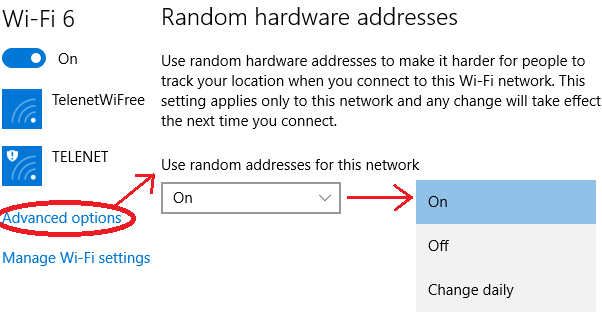
It's also possible to disable randomization for certain networks. In this case Windows will use the original address when connecting to a network. You can configure this through the following settings when you are currently connected to the network:

Notice that the user has three options for each specific network:
  • On: the same random MAC address is always used when connecting to this network.
  • Off: the original MAC address is used.
  • Change daily: every day a new random MAC address is used.
Remark that if randomization is enabled, independent of the above options, Windows 10 will always use random MAC addresses when scanning for nearby networks. This "scanning" address changes every time you connect (and disconnect) from a network, and when you restart your device [3]. Hence it doesn't change that frequently, but it's still sufficient to prevent tracking over extended periods of time. In contrast, Apple changes the scanning address roughly every few minutes, which provides more privacy.

Basic Security Analysis

Randomization as implemented in Windows 10 significantly improves your privacy. So enable it! Unfortunately, it's not perfect, because there are still some ways to defeat or bypass it.

The first weakness is that the sequence number contained in WiFi frames is not reset when changing the (random) MAC address. This sequence number, which is present in most Wi-Fi frames, is used to detected retransmissions, and is incremented by one after successfully transmitting a frame. As shown in the picture below, when the MAC address changes because the user connects to a network, the sequence counter is not reset:


The last frame from ea:69:0a:* has the sequence number of 92, and the other address 7c:5c:f8:* has the sequence number 94. Based on this an adversary can reasonably conclude that both frames are sent by the same device. In other words, he learns that the same device was using both addresses, defeating the purpose of address randomization.

The second problem is that Windows 10 reveals its real MAC address when interacting with Hotspot 2.0 networks. But what's Hotspot 2.0? Simply put, Hotspot 2.0 is a new standard to automatically and securely roam between WiFi networks. No manual interaction is needed. Your device automatically determines whether you have the appropriate credentials (passwords) to connect to a network. Think of this like the cellular network: when you get off the plane, your phone automatically finds and connects to a foreign cellular network. Hotspot 2.0 provides a similar experience for WiFi.

In order to accomplish automatic roaming, Hotspot 2.0 sends ANQP queries to the Access Point before connecting to it. These ANQP queries request detailed information about the wireless network. This information includes the credentials that are needed to connect with the hotspot, whether the hotspot provides internet access or only local network access, etc. Unfortunately, Windows 10 sends these ANQP queries using the real (original) MAC address:


In the first probe request it uses the random MAC address 2a:b3:e6:*. These probe requests are used to detect the presence of networks. If there's a Hotspot 2.0 network nearby, Windows will send ANQP requests using the real MAC address, in this case 7c:5c:f8:*. Therefore an attacker can obtain your real MAC address by advertising a Hotspot 2.0 network. Thankfully, Windows 10 only sends ANQP queries if at least one Hotspot 2.0 is configured. Since this standard is not yet widely deployed, few users will have such a network configured [4].

Detailed Security Analysis

Want to know all flaws that are present in existing implementations of MAC address randomization? And this specifically for Android, Apple, Linux, and Windows? Then read my paper Why MAC Address Randomization is not Enough: An Analysis of Wi-Fi Network Discovery Mechanisms [5]! It has everything explained in technical detail.


References and Footnotes

[1] If you have an Intel 7260 AC, you can also force Windows 10 to use the drivers of the Intel 7265 AC. Your device will still work, and will support MAC address randomization.
[2] Even though authentication based on the MAC address is utterly insecure (an adversary can easily spoof a MAC address), it's still used by many systems.
[3] C. Huitema. Personal communication, Nov. 2015.
[4] One notable exception is the Passpoint configuration provided by Boingo. Essentially Passpoint is a synonym of Hotspot 2.0. If you have this configuration installed, you have a Hotspot 2.0 capable device, and the Boingo configuration will use Hotspot 2.0. This means Windows will send ANQP queries to nearby Hotspot 2.0 networks.
[5] M. Vanhoef, C. Matte, M. Cunche, L. S. Cardoso, and F. Piessens. Why MAC Address Randomization is not Enough: An Analysis of Wi-Fi Network Discovery Mechanisms (AsiaCCS 2016).

Sunday, 10 November 2013

Unmasking a Spoofed MAC Address (CVE-2013-4579)

Update: This vulnerability has been fixed in kernel 3.8.13.16 and above.

Certain Atheros wireless drivers do not properly update the MAC address when changed (spoofed) by a user. This allows an active attacker to retrieve the original MAC address. In short, spoofing your MAC address does not always hide the original MAC address.


Background

While working on the ath9k_htc driver (used by Atheros USB WiFi donglesI noticed the driver did not properly set a spoofed MAC address. Though the device appears to use the newly assigned MAC address correctly, the flaw allows an attacker capable of injecting packets towards the target to uncover the original MAC address.

The cause of the problem lies in how the driver and hardware implement Multiple Virtual Interface (VIF) support. Using this technology a single wireless chip can listen on multiple MAC addresses. Because sending an acknowledgement to correctly received packets is done in hardware, a question that arises is how the wireless chip can quickly determine whether a wireless packet was destined for it. At first you'd think there must be some method to give the hardware a (possibly fixed length) list of MAC addresses to listen on. However, some devices uses a different strategy (and in particular Atheros devices uses this method). Their strategy is the following: the wireless chip has a register which contains the "main" hardware MAC address (mainmac), and a register containing a mask (macmask). Given an incoming frame destined for a particular mac (incmac), it sends an ACK and accepts the frame if and only if: (mainmac & macmask) == (incmac & macmask). You can see that macmask determines which bits of incmask (MAC of the packet being received) have to match those of mainmac. Essentially the macmask represents the locations where the bits of all the virtual MAC addresses are identical to the "main" hardware MAC address (mainmac).

To clarify, consider a device having two virtual interfaces, one with MAC address 72:40:a2:3f:65:5a and another one with address 8e:8e:95:cd:90:4e. In binary these MAC addresses are:
01110010 : 01000000 : 10100010 : 00111111 : 01100101 : 01011010
10001110 : 10001110 : 10010101 : 11001101 : 10010000 : 01001110
Now, macmask should consist of the bits where both these MAC addresses are the same (mathematically that's the negation of the XOR). In our example the mask would be:
00000011 : 00110001 : 11001000 : 00001101 : 00001010 : 11101011
So the wireless chip can pick either 72:40:a2:3f:65:5a or 8e:8e:95:cd:90:4e as its main MAC address, and then set the mask to 03:31:c8:0d:0a:eb. Frames sent to either of these MAC addresses will now be accepted and acknowledged. For more details see the comments in the atheros driver source file. Unfortunately this technique has the side effect that the wireless chipset now listens on more MAC addresses then we really want, as not all bits of incoming frames are checked!

Vulnerability Details

When a MAC address is spoofed the driver does not simply update the mainmac register. Instead the mainmac register will still contain the original MAC address, and macmask will contain the bits where the original and spoofed MAC agree (see previous section). The wireless chip will acknowledge frames sent to the spoofed MAC addresses, and the operating system will include the spoofed MAC address in all packets, so everything will seem to work properly. Unfortunately this method allows an attacker to uncover the original MAC address bit by bit (given the spoofed MAC address). Specifically we can determine the value of any bit of the original MAC address as follows:
  1. Flip the bit in the spoofed MAC address and send a packet to the modified MAC address.
  2. We now have two cases:
    • The device replies with an ACK: This means the mask for this bit is zero, thus the bit in the spoofed MAC address was different than the original MAC address.
    • Device doesn't reply: This means the mask for this bit is one, so the bit we are guessing was identical to the bit in the spoofed MAC
By doing this for each bit, we eventually learn the complete original MAC address.

The vulnerability has been successfully exploited against AR7010 and AR9271 chipsets (which use the ath9k_htc driver) under following operating systems:
  • Debian 7.2.0 amd64 and i386
  • Kali 1.0.5 amd64 and i386
  • Ubuntu 13.10 amd64 and i386
The ath9k driver is not vulnerable (see comments below). The ath5k and ath10k were not tested and/or investigated. Other drivers also capable of creating multiple virtual interfaces with different MAC addresses, on a single device, might also be susceptible to the same vulnerability (so feel free test your device and post results).

Exploit

A proof of concept has been implemented in python using scapy. Given a MAC address that you suspect to be spoofed the tool will attempt to uncover the original MAC address. In case the tool returns the same MAC address as you entered, it means the target is not susceptible to the attack, or that the target is using the default MAC address of the device.

Patch

Update: I have made a patch and submitted it to the linux-wireless@vger.kernel.org mailing list (before this patch I also notified the ath9k-devel mailing list of the bug and filed a bug report for debian). The CVE ID of this bug is CVE-2013-4579.

Final Remarks

Though spoofing a MAC address can be done securely by simply updating mainmac, an attacker can use the same technique to learn that two virtual MAC addresses actually belong to the same user. So if you put up several virtual interfaces (possibly with random MAC addresses) they can be easily linked back together (again, that's if your device uses a method similar to the one described above). This flaw is inherent to usage of macmask and, at first sight, seems difficult to fix.

Wednesday, 1 February 2012

Foundations of Privacy

Privacy is a difficult concept and there are many sides to the privacy issues we are facing in our digital age. For my master thesis I studied privacy in databases, where the goal is to find a mathematical definition of privacy. But in this post I won't focus too much on the math behind it all, instead I'll go over some interesting observations I have made during my work, and explain some of the basic concepts. To get started we'll look at some privacy fiasco's that occurred in the past.

1. AOL Search Fiasco

We begin with the AOL search fiasco where AOL released around 20 million search queries from 65,000 AOL users. In an attempt to protect privacy, the username of each individual has been changed to a random ID. However, different searches made by the same person still have the same ID. Shortly after the release the person with ID 441779 was identified as Thelma Arnold. By combining all the searches she made, it became possible to find out her real identity. This already shows that simply removing unique identifiers such as a person's name, address or social security number do not provide privacy, and more generally that anonymity does not imply privacy (more on this later). No real care was given to anonymizing the search results. So this is not a true example that removing identifying attributes (eg., name, address, etc.) fails to protect privacy, as no real care was given to anonymizing the dataset. This can be deduced from the observation that the person who was responsible for releasing the data was quickly fired.

2. The HMO Records

In this attack the medical records of the governor of Massachusetts were revealed. The attack begins with the following observation: One can uniquely identify 63% of the U.S. population with only knowing the gender, ZIP code and date of birth of an individual. We now turn our attention to two different datasets. The first one is the voter registration list for Cambridge Massachusetts and includes information of each voter. A bit simplified the dataset can be represented using the following relation:
VoterRegistration(ZipCode, BirthDate, Gender, Name, Address, DateLastVoted)
The second dataset is the Massachusetts Group Insurance Commissions medical encounter data, containing medical information on state employees (and thus also contained the medical records of the governor of Massachusetts). A small part of this medical data, without all identifying information such as name, address and social security number removed, were released. It can be represented using the following relation:
MedicalData(VisitDate, Diagnosis, Procedure, ZipCode, BirthDate, Gender)
As we can see both datasets can be linked to each other by combining gender, ZIP code and date of birth! So even though the names were removed in the medical dataset, researchers were still able to link the data back to individuals. As a result the medical records of the governor of Massachusetts were found.

3. Kaggle

Finally we come to an example that shows it's possible to find correspondences between social networks merely based on the structure of underlying friendship relations. Even more interesting is that the art of "de-anonymizing" a dataset was used to win a competition. Kaggle organized a competition where participants were given a dataset of people and their underlying relations, which we will call a social graph (each node is represented using a random ID and no information such as username, name, location, etc. were included). An example of a social graph is shown in the figure below:
The circles/letters represent people and a line is drawn between them if they are friends. However not all relationships were given to the participants. In fact, the goal of the competition was to determine whether certain given relationships, which were not present in the original social graph given to the contestants, were fake or real. Of course if we'd knew who the individuals behind all the nodes are, we could just look up if two nodes are really friends or not! So if we manage to de-anonymize the social graph given by Kaggle we can game the competition: Instead of making a machine learning algorithm to predict the answer we simply look them up.

It was found out the social graph was created by crawling Flickr. So the researchers made their own crawl of Flickr and based on the structure alone created a mapping between their own crawl and the Kaggle social graph. In other words they now know which individuals correspond to the supposedly anonymous nodes, and thus they identified the individuals using only the structure of his or her social graph.

The Difficulty of Absolute Privacy Protection

It should be obvious by now: Assuring privacy is hard. We can't simply remove attributes such as name, address, social security number, etc. from a dataset. The reason is that seemingly innocent information such as gender, ZIP code, and birthdate can still be used to uniquely identify an individual. Clearly the need for a rigorous privacy definition is needed. Researchers have proposed theoretical models such a k-anonymity, but it turned out to have problems so L-diversity was suggested. I turn weakness were found in L-diversity, resulting in a new definition called T-closeness. But still there are problems even for T-closeness. So in practice assuring privacy is hard, and even finding a robust mathematical definition appears to be a challenging task. What can be done?!

Before answering that question we're going to argument that the situation, at least from a theoretical point of view, is even worse than one might already think. There is in fact theoretical evidence suggesting that absolute privacy protection is impossible. This proof was heavily based on an earlier attempt at the proof. Now of course not releasing your information does provide absolute privacy. But what they have proven is that if a database is sufficiently useful there is always a piece of external information that, combined with the output of the database, violates the privacy of an individual. An example explains this best. Assume that learning the salary of an individual is considered a privacy violation. Further assume that we know the salary of Alice is 200 EUR higher than the average salary of a Belgian citizen (this is the external information). So we don't know her exact salary. Let's say we now receive access to a database containing the salary of every Belgian citizen. From this database we can calculate the average salary of a Belgian citizen, say 2500 EUR. Combining this with the external information teaches us that the salary of Alice is 2700 EUR! Et voila, the privacy of Alice has been violated. All due to gaining access to a database from which we merely learned an average of a particular value.

So it seems it's very difficult (impossible) to assure that there will be no privacy violation whatsoever. What can we do? The answer is simple. We will reduce the probability of a privacy violation as much as possible.

Differential Privacy

One of the promising definitions in the privacy research community is called differential privacy. It provides relative privacy prevention, meaning that the probability of a possible privacy violating occurring can be greatly reduced. Important is that when using differential privacy the dataset is not handed out to the public. Instead users can pose questions (queries) to the dataset (eg., over the internet), and answers will be given in such a way to reduce the probability of a privacy violation. In practice this is done by adding a small amount of random noise to the answer. Note that there is always a tension between accuracy of the data, and the privacy guarantees provided by the data release. The higher the privacy guarantees, the lower the accuracy.

Differential privacy assures that, when you provide your personal information to the database, the answers to queries will not differ significantly. In other words handing over your information should not be visible in the calculated answers. This results in a more natural notion of privacy: When giving your information your privacy will on be very minimally reduced (remember that we consider absolute privacy protection impossible).

More formally, when you have two databases, one with your personal information (D1) and one without your personal information (D2). Them the probability (Pr) that an answer mechanism (K) returns a specific answer (S) should be nearly identical (multiplication by exp(epsilon)) for both databases. Mathematically this becomes
The parameter epsilon defines how much the probabilities are allowed to vary. A small epsilon such as 0.01 means the probabilities should be almost identical (within multiplicative factor 1.01). However for a larger epsilon such as 1 the probabilities can differ by a larger amount (they must now be within multiplicative factor 2.71). The reason we use the exp(epsilon) instead of just epsilon is because manipulating formulas that use exp(epsilon) is a lot more straightforward.

We can now design algorithms that answer queries while assuring differential privacy. In short we can now prove we assure a certain definition of privacy! There are still some difficulties in implementing differential privacy in practice. There first one is that it's not clear what a good value for epsilon would be. The second problem is that you cannot ask an unlimited amount of questions (queries) under differential privacy. So in practice a reliable mechanism must still be designed to ensure only a limited amount of queries are answered.

Another downside is that the actual dataset is not released. For researchers being able to visually inspect the dataset and first "play around with it" can be important to gain a better understanding of it. Therefore the problem of releasing an anonymous dataset, while minimizing the probability of a privacy violation, is still an important topic.

Anonymity vs. Privacy

Another important observation is that anonymity does not imply privacy. Take for example k-anonymity. It states that an individual must be indistinguishable to at least k-1 other individuals. Below we give an example of a 4-anonymous database. Based on the non-sensitive attributes, which are used to identify an individual, we notice there are always at least 4 rows having the same values. Hence each individual is indistinguishable with at least 3 other individuals.
If you know a person having Zip code 1303 and an age of 34 is present in the database, he or she can correspond to any of the four last rows. So the anonymity of that individual is preserved. However all four rows specify that he or she has cancer! Hence we learn our targeted individual has cancer. Anonymity is preserved while privacy was violated.

The Ethics of Using Leaked Datasets

Another observation made during my master thesis is that it's hard for academic researchers to obtain dataset to test their algorithms or hypothesis. Even worse is that most are forced to create their own datasets by crawling public profiles on sites such as Twitter, LiveJournal and Flickr. This means their test data only contains public profiles, creating a potentially significant bias in their datasets. Another problem is that researchers won't make these dataset publically available, probably out of fear of getting sued. And that is not an irrational fear, demonstrated by the fact that Pete Warden was sued by facebook for crawling publicly available data. Because these datasets are hard to obtain, peer review becomes difficult. If another, independent, researcher doesn't have access to the data he or she will have a very hard time trying to reproduce experiments and results.

But more interestingly is that there are public dataset available! It's just that no one seems to dare to use them. As mentioned the AOL  dataset was publicly released, but researchers are hesitant to use it. Another dataset, called the Facebook100 data, is also a very interesting case. Researchers were given social graphs of 100 American institutions in anonymized form (private attributes such as name, address, etc. were removed). Amazingly the dataset contains all friendship relations between individuals present in the dataset, independent of their privacy settings on facebook. As we've seen an unmodified social graph can be vulnerable to re-identification attacks (see the Kaggle case). A week after the release facebook requested the dataset to be taken down. Deleting data on the internet is hard however, and copies of it are still floating around. Nevertheless, because facebook requested to dataset not to be used, researchers seem to be hesitant to use this dataset.
"Privacy issues are preventing a leap forward in study of human behavior by preventing the collection and public dissemination of high-quality datasets. Are academics overly-sensitive to privacy issues?"
It's clear why researchers aren't touching these datasets. Either they include too much personal information, the data provider has requested to take the dataset down, or out of fear of getting sued. The question is if this behavior really benifits the user, the one who we're trying to protect. The answer is NO. Let's look at all the players in this game:
  1. Researchers don't conduct research on the "leaked" datasets. This hinders scientific progress.
  2. Users are less aware of vulnerabilities as researchers can't demonstrate them.
  3. Companies benefit as they don't get bad press about leaked data & possible privacy issues.
  4. Malicious individuals benefit since vulnerabilities remain unknown, which in turns morivates users to continue sharing information publicly. They are also not limited by moral objections and will use the leaked data if valuable.
Currently only the companies and malicious individuals benefit from this behavior. Scientists and users are actually in a bad position by not allowing/doing research on public/leaked datasets. A utopian view would be that researches conduct analysis on the datasets and make advancements in their field. At the same time users can be warned about potential vulnerabilities caused by the leaked data before hackers will abuse them.

Fear Based Privacy

A mistake to watch out for, at least in my opinion, would be what I call fear based privacy. Yes, you have to remain diligent to make sure the government and companies don't collect too much information. And yes, you should be careful about the information you provide to the public! But one must first carefully consider the arguments for, and against, making information public. A knee-jerk reaction saying that any information you share might potentially be abused by a malicious individual is not a valid argument. It's an argument purely based on fear: "Even if we don't know yet how a hacker could abuse certain information, who knows he or she might find a method in the future, so it's better not to share anything."

Now don't get me wrong here. Currently I believe that an absurd amount of information is being collected, especially on the internet, and that this is not a good thing. But a good balance must be found between the benefit of sharing information, and the potential risks for sharing said information. Compare it to driving a car. It involves the risk of possibly getting in an accident. However, the benefit that a car provides outweighs its risks, and instead of completely avoiding cars we attempt to reduce the probability and severity of accidents.

Interesting Links

    Special thanks goes to Jan Van den Bussche of University Hasselt (Belgium) for helping me during my master thesis.